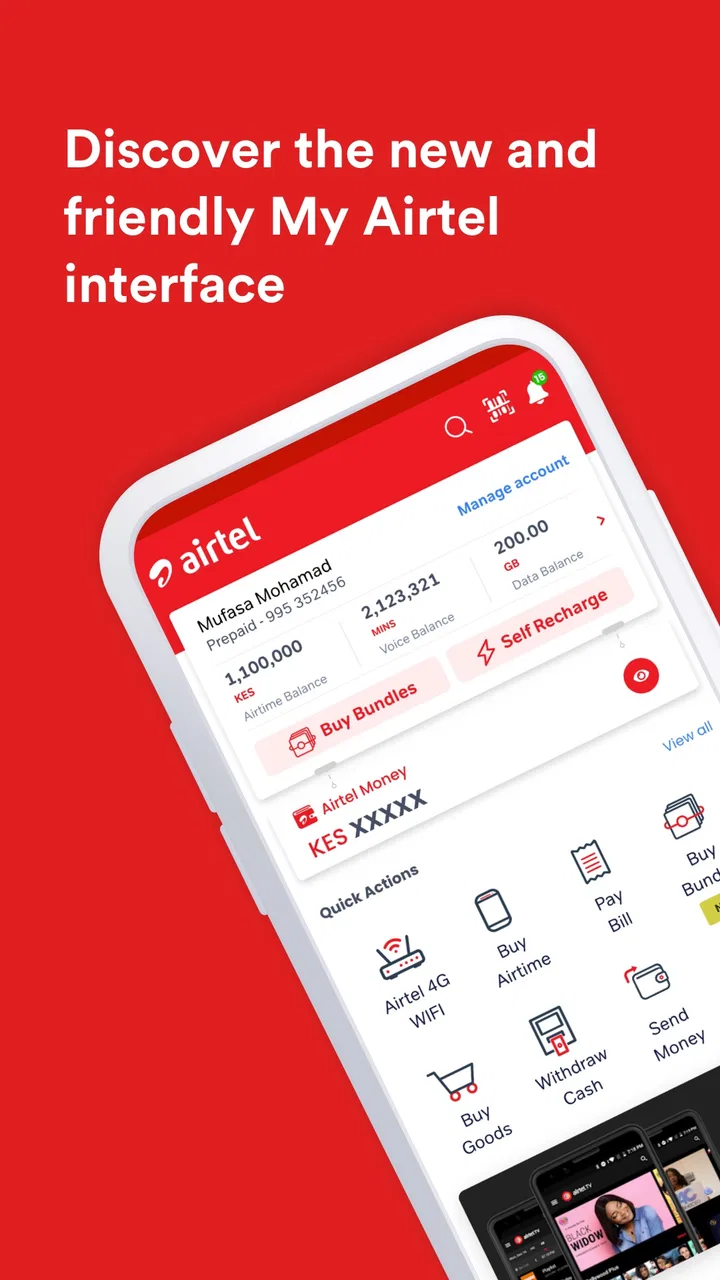
My Airtel
- 4.5
- Rating
- 50.00M
- Installs
- Free
- Price

 Analysis by App-foxy
Managing mobile service from a phone sounds simple until a recharge is urgent, a bill is due, or money needs to move between accounts. My Airtel is built around those everyday moments. Developed by Airtel Africa, this free Lifestyle app brings mobile recharges, bill payments, money transfers, and wallet or bank-related transactions into one place. I found its main appeal less in flashy presentation and more in reducing the number of separate tasks I need to remember when dealing with my Airtel account.
The important thing is to view it as a practical service companion rather than a general finance app. It is most useful when your mobile line and payment activity already sit inside the Airtel ecosystem. If you mainly use another network, another wallet, or a separate banking application, much of its value disappears. For the right user, though, having account-related actions together can make a noticeable difference, especially when a payment has to be completed quickly.
How My Airtel feels in everyday use
On my phone, the experience makes the most sense when I approach it with a specific task: recharge a line, settle a bill, send money, or check a wallet-related action. That focused approach is better than opening the app without knowing what I want, because a service hub can otherwise feel busy. The app is trying to cover several connected needs, and those needs do not all matter equally to every user.
You May Also Like

 Blood Strike: 2.5 Anniversary
Blood Strike’s Loadouts Turn Every Drop Into a Tactical Gamble
A close look at Blood Strike’s custom loadouts: how fast access to signature weapons reshapes its battle royale rhythm, rewards preparation, and narrows the gap between fights.

 Pandora - Music & Podcasts
Pandora’s Music Is Easy to Start, but Harder to Recover
Pandora’s strength is its low-effort path from a seed to a station. Its weak spot is how much confidence it asks you to place in connection, setup, and quiet recovery.

 8 Ball Pool
8 Ball Pool Is Built on Rivalries, Rematches, and Routine
A close look at the rivalries, rematches, shared routines, and unanswered safety questions that turn a quick pool match into a persistent mobile community.

 Samsung Music
Samsung Music’s Quiet Strength Is Playing What You Already Own
Its reach comes less from spectacle than from dependable access to a personal library. That simplicity is both the app’s strongest retention engine and its ceiling.

 AccuWeather: Weather Radar
AccuWeather Review: A Quick, Clear Forecast for Everyday Decisions
For everyday plans, the best forecast is the one you can understand quickly. AccuWeather makes rain timing, radar, and local conditions easy to act on, with a few trade-offs.

 Hill Climb Racing
Why Hill Climb Racing Still Turns Crashes Into One More Run
A tiny car, a bumpy hill and one more upgrade: Hill Climb Racing keeps resurfacing because its simple chaos makes every near-miss feel personal.
More From Our News Desk



A realistic example is a busy morning when a family member calls to say their airtime has run out. Instead of finding a retailer, switching between a banking app and a messaging app, or searching for a payment code, I can use the same service environment to handle the recharge. The convenience is especially clear when I am away from home or when a physical top-up option is not nearby.
Another useful situation is monthly household administration. I can treat the app as a small checklist: confirm the mobile balance, complete a recharge, handle a bill, and use the available transfer tools when necessary. That does not make financial planning automatic, but it keeps several routine actions close together. I would still review each recipient and amount carefully before confirming anything.
The interface is best judged by how quickly it gets me to the correct action. A combined app can save time, but it also creates a responsibility for me as the user: I need to distinguish a mobile recharge from a bill payment and a transfer before approving a transaction. The convenience of one dashboard should not encourage careless tapping.
My Airtel is rated for Everyone, which fits its broad purpose. A teenager, a parent managing several lines, or someone who simply wants fewer service-related apps could understand the basic idea quickly. However, age suitability does not remove the need for financial caution. Anyone using wallet or transfer functions should protect their phone and check transaction details, just as they would in a banking application.
A practical hub for Airtel customers
The strongest reason to install it is concentration. Instead of treating recharging, bill handling, and money movement as unrelated chores, the app presents them as parts of one Airtel experience. I appreciate that when I am already an Airtel customer, because I do not have to begin every task by deciding which separate service channel to use.
The app has earned a 4.5 average from around 581 thousand ratings, and its reach is substantial, with over 50 million installs. Those figures do not guarantee that every transaction will feel effortless, but they do show that this is not a niche utility used by only a small group. There is a large audience relying on this style of mobile account management.
Its free price also lowers the barrier to trying it. I do not need to justify another subscription simply to access basic account tools. That said, free access to an app should not be confused with free financial transactions or free mobile service. The cost of a recharge, bill, or transfer depends on the underlying service and the terms applicable to the user, so I would always check the confirmation screen rather than assuming that the app itself makes every action costless.
One detail I find useful is the possibility of using the same app for personal and family-related tasks. If I regularly recharge another Airtel number, the app can become a central place for that routine. The trade-off is that convenience can make it easy to lose track of whose line I am paying for. I recommend pausing before confirmation and checking the number displayed, particularly when several family members depend on the same person for recharges.
What the current version says about its direction
The current version is 1.4.22, and the app was released on August 28, 2019. That history matters because My Airtel is not a brand-new experiment; it has had time to become an established part of Airtel’s mobile-service approach. I see the present release as the continuation of a product that aims to keep core account and payment actions in one place.
The version number alone does not tell me that every screen has been redesigned or that every regional service behaves identically. Airtel services can vary by market, and the actions visible to one customer may not match those available to another. I would therefore judge the app by the tools shown after signing in, rather than assuming that the store summary represents an identical experience for every location.
What I can reasonably take from the current release is that the app remains focused on its central job: managing mobile service and connected payments from a phone. I would not install it expecting a full replacement for every banking product or a universal financial dashboard. Its evolution appears more meaningful when understood as the expansion and maintenance of an Airtel-centered service channel.
The minimum operating requirement is Android 8.0, which makes the app accessible to many users with older Android phones while still excluding devices that are considerably behind current software. Before planning a switch from another method, I would check the Android version on the phone I intend to use. A useful service app is only useful if the device can run it reliably.
How existing users may experience the changes
For someone who already uses Airtel services, the biggest benefit is continuity. Once the app becomes part of a routine, I can return to the same place for a recharge or payment instead of learning a new process each time. Updates are most valuable when they make those familiar paths clearer, preserve transaction confidence, and keep the main tasks easy to find.
There is also a psychological advantage to having a visible service history inside one account environment. Even when I am not doing detailed budgeting, seeing my Airtel-related actions together can make it easier to remember what I have already paid. I still would not use that convenience as a substitute for a proper personal finance record, especially if I use several payment methods.
Existing users should expect some adjustment after updates. A button can move, a payment flow can ask for confirmation at a different point, or the balance and transaction areas can be presented differently. My practical advice is to avoid learning a new layout during an emergency recharge. Open the app when there is no pressure, identify the recharge and payment areas, and make sure the correct account details are visible before you need them.
Updates can also affect performance differently across phones. On a newer device, a refreshed interface may feel smooth, while an older handset may take longer to open or switch between sections. Since the app supports Android 8.0 and above, the range of hardware can be broad. I would keep the operating system updated where possible and avoid relying on the app as the only way to reach an essential service.
Where it fits beside the usual alternatives
The most direct alternative is a physical retailer or recharge outlet. That option remains useful when I need cash, when my phone is unavailable, or when a digital payment does not go through. My Airtel is more convenient for remote top-ups and after-hours tasks, but it depends on a working phone, an available connection, and a successful payment path.
Another alternative is a bank app. A bank application may be the better choice when I need broader account management, detailed financial records, or payments that are not connected to Airtel. My Airtel wins when the task begins with the Airtel line or its related services. I would not replace a complete banking app with it if my main priority is managing savings, card activity, or multiple financial institutions.
General-purpose wallets and payment apps can also be stronger for users who send money to many different services or contacts. Their wider reach may matter more than Airtel-specific convenience. My Airtel makes the most sense when mobile service is the center of the task and the surrounding payment functions are relevant to my daily life.
This distinction helps avoid a common mistake: installing the app because it includes the word “money” in its feature set, then expecting the depth of a dedicated financial product. I see it as a focused bridge between Airtel connectivity and selected payment actions. That focus is a strength for customers inside the network, but a limitation for people seeking a neutral, all-purpose financial tool.
Small workflows that make it more useful
I get better results when I separate preparation from confirmation. Before opening the payment screen, I decide whether I am recharging my own line, helping someone else, paying a bill, or transferring money. This sounds obvious, but it reduces the chance of choosing the wrong service in a combined app. I then check the recipient or account information and the amount one more time before completing the action.
A second useful habit is to use the app for planned tasks rather than waiting for a crisis. If I know a bill or regular recharge is approaching, I can open My Airtel early enough to deal with a failed attempt or a confusing screen without pressure. This is particularly important for users who rely on a single phone for communication and payments.
For households, I would keep a simple note of which Airtel numbers I commonly recharge and why. The app may make the payment quick, but it cannot prevent a user from selecting the wrong number. A short personal record is an effective safeguard when several lines look similar or when one person manages service for relatives.
I would also compare the app with my existing payment route before moving every task into it. If my bank app already gives me a clear record and works reliably for a particular bill, there may be no reason to change. The better workflow is the one that leaves me with the clearest confirmation and the easiest way to identify a problem later.
The gaps I would consider before relying on it
The main limitation is ecosystem dependence. The app is not equally compelling for everyone because its purpose is tied closely to Airtel services. If my mobile line belongs to another operator, or if I rarely use Airtel-related payments, I would probably choose a broader wallet or my bank’s app instead.
There is also a difference between centralization and completeness. Putting several actions in one application is convenient, but it does not automatically provide the detailed controls, reporting, or dispute tools I might expect from a specialist product. For larger financial decisions, I would use a dedicated banking channel and keep My Airtel for the Airtel-specific task.
Transaction confidence is another area where I remain cautious. A clean flow can encourage speed, yet mobile payments deserve deliberate checking. I would confirm the number, bill reference, recipient, and amount every time. If a transaction appears delayed or unclear, I would avoid immediately repeating it, because duplicate attempts can create more confusion than the original problem.
Users with unreliable connectivity should also keep a backup plan. The app is designed for phone-based access, so a weak connection or an unavailable device can interrupt the process. A nearby retailer, an established alternative payment method, or another official Airtel channel may be more practical in that moment. I would not wait until an urgent recharge to discover that my usual route is unavailable.
Finally, the app’s broad audience means that not every screen will feel equally relevant. Someone who only wants occasional airtime may find a multi-purpose service app heavier than a simple retailer visit. Someone who actively uses Airtel’s connected payment options is more likely to appreciate the additional sections. The right choice depends on how often I need those services, not just on the number of features shown.
What I would watch as the app continues to evolve
For future updates, I would pay attention to clarity before novelty. The most valuable improvement would be making the distinction between recharge, bill payment, wallet activity, and transfers unmistakable at every step. When money and mobile service share one app, clear labels and confirmation details matter more to me than decorative changes.
I would also watch how consistently the app serves different Airtel markets. A regional service can be useful while still offering different tools depending on where the account is registered. The practical question for a new user is not whether the app has a broad summary, but whether the particular services they need appear for their account and work with their preferred payment method.
Reliability will remain more important than a long feature list. I want the app to open when I need it, show the correct account, and make the outcome of a payment easy to understand. Those are modest expectations, but they are exactly what determines whether I trust a service during a time-sensitive recharge or bill payment.
I would also like existing users to watch their own habits after an update. If a new layout changes where confirmation details appear, take a moment to learn it before making a high-pressure transaction. Product evolution is helpful only when the user adapts carefully enough to preserve the same level of attention.
My recommendation for the right kind of user
I recommend My Airtel to Airtel customers who regularly recharge mobile lines, handle related bills, or use the app’s transfer and wallet functions. Its free access, broad availability, and single-service approach make it a sensible companion for people who want fewer separate routes for routine Airtel tasks. The Everyone rating also makes it approachable for a household, provided the person making payments treats the financial steps seriously.
I would skip it if I need a complete banking replacement, use several mobile networks, or prefer handling every payment through an existing bank or general-purpose wallet. In those cases, the extra Airtel focus may add another app without solving a real problem. I would also keep an alternative method available for urgent situations involving poor connectivity or an unavailable phone.
Overall, I see My Airtel as a useful, focused service app rather than an all-purpose financial solution. Its best quality is the way it brings common Airtel tasks into one familiar place. Its main weakness is the same focus: outside the Airtel ecosystem, there is little reason to choose it over a broader alternative. For the customer it is designed to serve, though, it can turn scattered mobile chores into a more manageable routine.
FAQs for My Airtel
01What is My Airtel and what can I use it for?
My Airtel is Airtel’s official self-service app for managing your mobile account and related services. After signing in with your Airtel number, you can usually check your balance and data usage, recharge prepaid lines, pay postpaid bills, review available plans, manage selected services, and access support. Features may differ depending on your country, Airtel subscription, and the latest version of the application.
02Is My Airtel free to download and use?
The My Airtel application is generally free to download from the official Google Play Store or Apple App Store. However, some actions performed inside the app involve payment, such as purchasing data bundles, renewing plans, paying bills, or subscribing to digital services. Mobile data charges may also apply when using the app, especially if you are not connected to Wi-Fi. Always check the final price before confirming a transaction.
03Can I use My Airtel to recharge a number or pay an Airtel bill?
Yes, My Airtel commonly supports prepaid recharges and postpaid bill payments, although the available payment methods depend on your Airtel market. You may be able to pay with a bank card, mobile wallet, online banking service, or another locally supported option. Before completing the transaction, verify the phone number, selected amount, and payment details because successful recharges or payments may not always be reversible.
04Do I need an Airtel SIM card or phone number to use My Airtel?
Most account-management features require an active Airtel mobile number because the app uses it to identify your account and verify access. Registration may involve an SMS verification code, and certain functions may work best while using the Airtel network. Some versions can display promotional content or limited services without a SIM, but checking balances, managing plans, and making account-specific payments generally requires Airtel customer credentials.
05Is My Airtel safe, and what should I do if the app does not work?
My Airtel should be downloaded only from Airtel’s official listing on Google Play or the App Store to reduce the risk of installing a counterfeit application. Keep the app and your device updated, avoid sharing verification codes, and review payment information carefully. If login, loading, or payment problems occur, check your internet connection, update or restart the app, and contact Airtel support through the official help options.
Pros
- Quick access to Airtel account balances and plan details.
- Convenient mobile recharge and bill payment options.
- Lets users manage multiple Airtel services in one place.
- Offers personalized plans
- promotions
- and recharge suggestions.
- Support tools help users troubleshoot common service issues.
Cons
- Some features may vary depending on the user’s country and Airtel service.
- The app may require frequent updates to maintain compatibility.
- Promotional notifications can feel excessive for some users.
- Loading times may increase during peak hours or network issues.
- Certain support requests may still require contact with customer service.

My Airtel
Gallery